What is SEO automation, and which routine SEO tasks should you automate first?

Last updated: October 10, 2026
Key Takeaways
- SEO automation means software performs a repeatable SEO task on a schedule or in response to a rule.
- Automate rank tracking first, then crawling and error monitoring.
- Automation wins on scale, but it loses the moment context matters.
- Automation tools are best when they reduce scanning time and make exceptions obvious.
- Quick Answer: automate 3 things first—weekly rank tracking, scheduled site crawls, and error alerts.
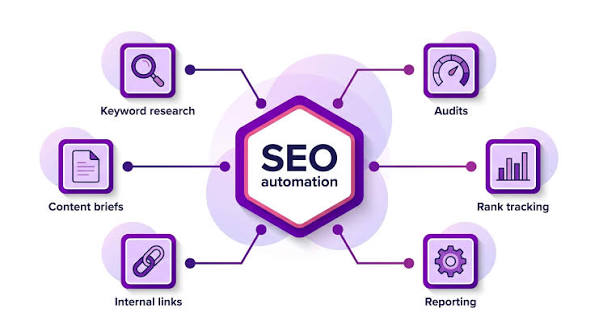
SEO automation is using software to handle repetitive SEO work so I can spend judgment where it matters: deciding what to fix, what to publish, and what to ignore. In this article, what is SEO automation and which routine SEO tasks should you automate first? The tasks worth automating first are rank tracking, site crawls, broken-link checks, redirect monitoring, sitemap checks, title/meta audits, and report gathering. I would not automate content strategy, final keyword targeting, or page-level quality decisions, because those still need a person with context.
I write about SEO and search tooling for a living, so I care less about shiny features than about where software actually saves time without creating bad decisions.
What SEO automation actually means
SEO automation means software performs a repeatable SEO task on a schedule or in response to a rule. That can be as simple as a weekly crawl that flags 404s, or as involved as a dashboard that pulls Search Console data and rank data into one report every Monday morning.
The key word is repeatable. If a task depends on judgment, nuance, or business context, automation should support it, not replace it. A crawl can tell me that /pricing-old returns a 404. It cannot tell me whether that URL should redirect to a new pricing page, be revived, or stay dead because it was a campaign landing page with no replacement.
A lot of generic SEO advice gets this wrong. It treats automation as a way to “do SEO faster.” That is too vague. Faster than what? Faster than manually exporting data from five tools? Yes. Faster than thinking through search intent, page purpose, and brand risk? No. If you are unsure where to draw that line, consult an SEO professional and lean on Google’s Search Console documentation and sitemap guidance as a baseline.
I’d draw the line like this:
- Automate the work that is mechanical, frequent, and easy to verify.
- Keep human control over anything that changes pages, messaging, or priorities.
- Use automation to surface exceptions, not to make the final call.
If you want a formal frame for the underlying process, Google’s own documentation on Search Console and sitemap guidance is a useful baseline, and the broader Schema.org standards are another place where automation meets structured data.
Which SEO tasks should you automate first?
Automate rank tracking first, then crawling and error monitoring. Those two categories often give the quickest payoff because they are repetitive, high-volume, and hard to do consistently by hand.
If I had to prioritize a new SEO stack for a small team, I would start with this order:
- Rank tracking for core queries
- Scheduled site crawls
- Broken-link and redirect monitoring
- Sitemap and indexation checks
- Title tag and meta description audits
- Reporting and alerts
- Structured data validation
- Log-file analysis, if the site is large enough to justify it
Rank tracking is first because it answers the basic question: did anything move? A weekly or daily check on a fixed set of priority keywords turns guesswork into a trend line. The weakness is obvious: rankings are not revenue, and isolated positions can mislead you. That is why I would keep the keyword set tight and tied to pages that matter commercially.
Crawls come next because they catch the technical problems that quietly pile up: 404s, redirect chains, duplicate titles, canonical mistakes, missing alt text, thin pages, and blocked assets. A tool can find all of that in minutes; a person should decide what matters. A 5,000-URL crawl without a decision process is just an expensive spreadsheet.
Broken-link monitoring and redirect checks belong close behind. These are the kinds of maintenance tasks that become invisible until traffic drops. A broken internal link on a template page can affect hundreds of sessions. A redirect loop can stop an important page from being indexed. Automation is good at spotting these early.
The honest trade-off: what software should not decide for you
Automation wins on scale, but it loses the moment context matters. That is why I would not automate page remapping, keyword intent selection, or content pruning without review.
A crawler may flag 300 pages with “thin content.” That does not mean 300 pages are bad. A support article with 120 words and a clear answer can be the right page. A product category with 40 words and strong internal links may still perform. A page about a discontinued service might deserve a redirect, a rewrite, or a noindex tag depending on its history.
This is where many teams over-automate and pay for it later. They build rules like “delete anything with fewer than X visits” or “rewrite every page with a low word count.” Those rules feel efficient, but they can remove pages that support conversions, brand queries, or long-tail discovery.
The better approach is to automate the flag, not the fix.
A useful rule of thumb:
- Automate if the output is a list.
- Review manually if the output is a decision.
That distinction matters most on larger sites. On a 200-page brochure site, a monthly human review may be enough. On a 200,000-URL catalog, not automating alerts and crawls is almost a refusal to manage the site properly.
SEO automation tools: what they’re good at and where they fall short
Automation tools are best when they reduce scanning time and make exceptions obvious. They are weak when you expect them to understand business priorities.
Here is the practical split I would use.
| Criteria | Rank-tracking tools | Crawl and audit tools | Winner for this condition |
|---|---|---|---|
| Best for | Daily or weekly visibility on priority queries | Finding technical issues across a site | Rank tracking for performance watching; crawlers for site health |
| Biggest strength | Trend monitoring with little manual work | Broad coverage of URLs and templates | Crawlers for large sites |
| Biggest weakness | Rankings can be noisy and context-poor | Findings need interpretation | Neither alone; pair both |
| Best input size | A focused keyword set | Any site where URLs can be crawled | Rank tracking for small teams; crawlers for larger sites |
| Typical output | Positions, movement, share of voice | Errors, warnings, page-level issues | Depends on the question |
| Best use case | Reporting and alerting | Technical maintenance | Rank tracking for reporting; crawlers for maintenance |
| Risk if overused | Chasing vanity movement | Fixing low-priority issues first | Crawlers if the team lacks triage rules |
| Time saved | High on repetitive checks | High on repetitive audits | Both |
| Human review needed | Always, before action | Always, before action | Both |
| Best first purchase | For teams watching performance weekly | For teams with recurring technical debt | Rank tracking for lean teams; crawlers for complex sites |
Rank trackers are the better first automation if the problem is “I need to know whether key pages are moving.” They are easy to set up and easy to explain to a client, founder, or manager. Their weakness is that they can create false urgency. A three-position drop on one keyword means less than a stable conversion page with traffic from twenty terms.
Crawler and audit tools are the better first automation if the problem is “our site keeps breaking in small ways.” They are more operational. They catch the stuff humans miss because humans do not like counting every URL. Their weakness is that they produce too many findings unless someone filters them by impact.
I would also automate reporting early, but only after I know which metrics matter. Auto-generated reports are useful when they collect Search Console, analytics, and rank data into one place. They are harmful when they dump 40 charts on a stakeholder who only needs five numbers.
Which routine SEO tasks should you automate first if you’re on a small team?
A small team should automate the tasks that protect time, not the tasks that sound impressive. Start with alerts, audits, and recurring exports.
My first picks for a small team are:
- Weekly rank tracking for 20 to 50 priority keywords
- Scheduled site crawls
- 404, 500, and redirect-chain alerts
- Sitemap status checks
- Title tag and meta description duplication reports
- Search Console export automation
- Basic structured-data validation
- Page-speed monitoring for a handful of top templates
Those are the tasks that keep SEO from becoming a panic-driven discipline. They also reduce the cost of checking things manually every Friday. A team that spends 3 hours pulling reports from multiple platforms is a team that is not doing strategy, content fixes, or link acquisition.
I would skip automation for keyword brainstorming, page brief creation, and final content edits. Those are not routine tasks in the same sense. They depend on the page, the audience, and the offer. A tool can suggest terms. It cannot decide which query should anchor a page about enterprise migration versus a page about starter pricing.
This is also where budget matters. If you only have room for one platform, choose the one that handles the task that breaks most often. A site with recurring technical issues needs crawl automation before fancy reporting. A site with a content team that needs accountability may benefit more from rank and report automation first.
When does SEO automation become a bad idea?
SEO automation becomes a bad idea when it turns into unattended SEO.
That happens in four common situations:
- The site changes often, but nobody reviews the alerts. A tool can produce warnings all day. If no one owns the queue, automation just creates noise.
- The site has fragile templates. On sites with ecommerce filters, faceted navigation, or multilingual setups, automated fixes can make a small problem worse.
- The business depends on brand-sensitive pages. Homepages, legal pages, pricing pages, and help centers usually need human review before any automated change.
- The team confuses efficiency with authority. A dashboard does not make an SEO decision correct. It only makes the decision faster to see.
I would also be cautious about automating anything that changes live pages without a human checkpoint. Auto-publishing title tag rewrites or mass noindex changes can save time on paper and create a cleanup project later.
The safest version of SEO automation is triage automation. Let the tool find the issue, group the issue, and assign the issue. Let the person decide the fix.
What should you automate before anything else?
Choose the tasks that repeat every week and create the same kind of work each time.
I would automate rank tracking first if your main problem is visibility. I would automate crawls and error monitoring first if your main problem is site health. I would automate reporting first if your main problem is wasted time in spreadsheets. I would not automate content decisions, redirect strategy, or keyword targeting until the team has a clear review process.
That is the simplest honest answer: automate the measurement before the judgment.
What’s the best way to start without overcomplicating it?
Start with one recurring report, one crawl schedule, and one alert list.
A practical first setup looks like this:
- A weekly rank report for core queries
- A weekly or monthly crawl, depending on site size
- Alerts for 404s, server errors, redirect chains, and indexing changes
- A short dashboard with only the metrics the team actually uses
That is enough automation for most teams to feel the gain without burying themselves in tooling. It also keeps the system understandable. If nobody can explain what the automation is doing, it is already too complicated.
The main risk is not under-automation. It is automating the wrong layer. That is why I would always start from a business question: “What do I need to know every week that I cannot afford to miss?” Then automate only that.
FAQ
Is SEO automation the same as AI SEO?
No. SEO automation is any software-driven repetition, from rank reports to crawls. AI SEO usually means using machine learning or generative AI to assist with research, drafting, or analysis. A crawler that runs every Monday is automation even if it uses no AI at all.
Can I automate all technical SEO?
No. You can automate detection, alerting, and some routine checks, but not every fix. A crawl can tell you there is a canonical problem; it cannot always tell you which canonical is right.
Should small businesses automate SEO?
Yes, but only the repetitive parts. A small business gets the most value from rank tracking, broken-link checks, crawl alerts, and reporting. It should not start by automating content strategy or page rewriting.
What SEO task saves the most time when automated first?
For most teams, site crawls and reporting save the most visible time because they replace manual checking and spreadsheet work. If rankings are the main concern, rank tracking is the fastest first win.
Can automation hurt SEO?
Yes. It can create noisy reports, encourage bad shortcuts, or push changes without enough review. The danger is not the tool; it is trusting the tool to make decisions it cannot understand.
Drafted with AI; not yet reviewed by a person.