
Last updated: October 10, 2026
Key Takeaways
- Automate the audit-and-alert layer first, because that is where SEO teams usually lose the most time for the least strategic value.
- A workflow is a defined process; a pipeline is the infrastructure that moves data and actions through that process.
- The strongest candidates are often the ones with a repeated trigger, a clear data source, and a direct action.
- Start with one source of truth, one crawler, and one routing layer.
Quick Answer
Automated SEO workflows & pipelines — The Complete Guide can usually be started with 2 to 4 core automations, and most teams see the best early value from crawl diffs, broken-link alerts, indexability checks, and reporting snapshots.
Automated SEO workflows and pipelines can stop recurring SEO chores when they are applied to repetitive, rules-based work such as audits, alerts, publishing checks, rank tracking, and reporting. This guide to Automated SEO workflows & pipelines — The Complete Guide focuses on what to automate, what to keep manual, and how to connect the pieces without creating a brittle mess.
What automated SEO workflows actually solve
They solve the part of SEO that drains time without improving judgment. If you are manually exporting crawl data, copying title tags into spreadsheets, checking rankings one keyword at a time, and pasting weekly updates into slides, you are doing work a pipeline can handle in minutes. The point is not to replace SEO thinking; it is to remove the repetitive steps that keep a team from doing the parts only a human can do.
The most useful automation targets are tasks with three traits: they are repetitive, they have clear rules, and the output can be checked. A title tag audit fits that pattern. So does a broken-link monitor, a sitemap diff, or a page-speed alert. A keyword strategy session does not. Neither does deciding whether a page deserves to be consolidated or rewritten. Those calls need context, intent, and trade-offs.
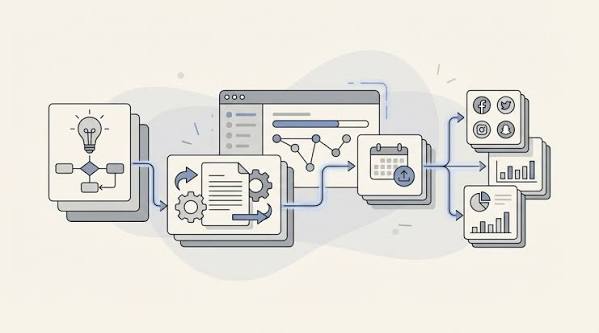
This is where generic SEO advice often goes wrong. It treats automation as a product category instead of a workflow design problem, and that can lead teams to build the wrong thing; if the stakes are high, consult a qualified SEO or analytics professional and verify the setup against current guidance from Google Search Central. The real unit is not “an SEO tool.” It is a sequence: crawl site, compare to last crawl, flag changes, enrich with business rules, route the issue to the right owner, and record the resolution. That can be built with Screaming Frog or Sitebulb for crawling, Google Search Console for search data, a data warehouse or spreadsheet for storage, and Zapier, Make, n8n, or native APIs for routing. The tools matter less than the handoff between them.
A useful pipeline also has failure modes. If your automation cannot tell the difference between a deliberate noindex and an accidental one, it will create noise. If it sends every “low word count” page to a content manager, it will bury them in false alarms. If it tracks rank without segmenting by device, country, or intent, the reporting will look precise and mean very little.
My position is blunt: automate the predictable, not the strategic. If a task needs human judgment more than once a month, keep it semi-manual. If a task repeats daily or weekly and the rules are stable, it belongs in a pipeline.
What should be automated first, and what should stay manual?
Automate the audit-and-alert layer first, because that is where SEO teams usually lose the most time for the least strategic value. The highest-value early wins are crawl diffs, broken-page monitoring, redirect checks, sitemap validation, rank snapshots, and reporting snapshots. Those tasks create immediate operational clarity without forcing you to redesign your whole stack.
A practical first workflow looks like this: crawl the site on a schedule, compare the latest crawl with the previous one, flag changes in indexability, canonicals, status codes, internal links, and metadata, then send only the meaningful deltas to Slack, email, or Asana. That is enough to catch accidental noindex tags, staging leaks, redirect loops, and template-level title changes before they spread. You do not need a machine-learning layer for that. You need consistent rules.
By contrast, keep these parts manual for now: topic selection, content angle, intent mapping, prioritization across business goals, and final editorial approval. Those choices require commercial context that automated systems do not have. A page with “low impressions” in Search Console may still be worth keeping because it supports a high-margin product or a sales motion. A pipeline cannot see that unless a person encodes the rule.
This is where many teams over-automate and then spend months fixing the damage. They build alerts for every on-page deviation, then stop trusting the alerts because half of them are harmless. They auto-generate content briefs and accidentally standardize mediocrity. They automate rank reporting and end up measuring vanity keywords that do not map to revenue. The consequence is simple: the team starts ignoring the system.
A better rule is to automate the parts where the decision tree is shallow. If a change can be described as “if X, then flag Y,” automate it. If the correct answer depends on audience, product margin, or editorial quality, keep a human in the loop.
For most teams, the first four automations should be:
- a weekly crawl comparison
- a broken-link and redirect monitor
- Search Console anomaly checks
- a reporting export into one source of truth
That alone can save hours every week and catch issues before they become expensive.
The real difference between a workflow and a pipeline
A workflow is a defined process; a pipeline is the infrastructure that moves data and actions through that process. If you only need a set of repeatable steps, a workflow is enough. If you need multiple systems to talk to each other on a schedule, a pipeline is the better model.
Think of it this way: a workflow might say, “every Monday, export crawl data, compare it to last week, and send a summary.” A pipeline adds the plumbing: scheduled crawl, data normalization, rule checks, enrichment, notifications, storage, and maybe a ticket creation step. The pipeline is what lets the workflow survive growth, multiple sites, and multiple owners.
This difference matters because teams often buy the wrong thing. A small in-house team may only need a few workflows inside a spreadsheet, a crawler, and an automation tool. A multi-site company with content, technical SEO, and analytics owners usually needs a real pipeline with consistent naming, structured outputs, and versioned rules. Without that, reports drift. Different people interpret the same issue differently. And by the time someone notices, the data is already messy.
The table below shows how I would separate the two.
| Criteria | Workflow | Pipeline | Winner for [condition] |
|---|---|---|---|
| Setup time | Fast; often built in a spreadsheet or no-code tool | Slower; usually needs API work or data modeling | Workflow for a small team that needs value this week |
| Scale across sites | Gets messy when rules differ by property | Handles multiple properties with shared logic | Pipeline for agencies or multi-brand teams |
| Error handling | Usually manual or ad hoc | Can log failures, retries, and exceptions | Pipeline when alerts must be reliable |
| Data consistency | Depends on whoever updates the sheet or tool | More consistent because inputs and outputs are standardized | Pipeline when leadership will see the report |
| Flexibility | Very flexible for one-off tasks | Less flexible once rules are formalized | Workflow for experiments and quick wins |
| Governance | Harder to audit later | Easier to document and review | Pipeline for regulated or high-stakes environments |
| Best input sources | Exports, spreadsheets, manual checks | APIs, warehouses, crawlers, event triggers | Pipeline when you need fresh data daily or weekly |
| Team size fit | 1–3 people | 3+ people or multiple stakeholders | Workflow for lean teams |
| Typical failure | Duplication and human drift | Overengineering | Depends on budget and complexity |
The downside of pushing straight to a pipeline is obvious: complexity grows quickly. You can spend three weeks building a system to save two hours a month. That makes no sense. For a single-site publisher, a workflow in Google Sheets plus a crawler export may be the smarter choice. The pipeline pays off when the same logic has to run across dozens or hundreds of URLs, or when missed issues are expensive.
Which parts of SEO belong in an automated pipeline?
The strongest candidates are usually the ones with a repeated trigger, a clear data source, and a direct action. Crawl monitoring is the cleanest example. So is Search Console anomaly detection. So is a content-refresh queue built from pages losing clicks over a 30- or 90-day window. Also in scope: broken-link detection, redirect chain checks, title and meta description audits, canonical mismatches, sitemap validation, index coverage monitoring, and page-speed alerts using Core Web Vitals thresholds.
I would also automate content operations around SEO. That means generating briefs from keyword clusters, assigning update owners, checking whether a published page contains the required headings or schema, and creating QA tickets when a page fails the checklist. For ecommerce and large publishers, internal-link suggestions can be automated too, provided a human approves the final changes.
Here is where a lot of articles stay vague: they say “automate reporting” but never define what reporting should contain. Good SEO reporting is not a dashboard full of green arrows. It is a structured summary of changed pages, impacted queries, pages that lost visibility, pages that gained visibility, and the specific action owner. A pipeline that simply sends rank numbers is not doing enough.
The strongest pipelines usually feed into one of four destinations:
- a task system like Asana, Jira, or Trello
- a chat channel for alerts
- a warehouse or spreadsheet for analysis
- a report layer for leadership
That split matters. Alerts should be short. Tasks should be specific. Reports should show trend and impact. If one automation tries to do all three, it becomes clutter.
There are also tasks I would not automate fully. Final title-tag approval belongs with the editor or SEO lead. URL consolidation requires a person who understands the business value of each page. Hreflang troubleshooting often needs manual review because the error may be technical, linguistic, or structural. Those are not “automation-friendly” decisions, even if the checking around them is.
For most teams, a good rule is: automate the finding, not the final call. Let the system detect the issue, score it, and route it. Let the human decide whether it matters.
How do you build an SEO automation stack without breaking things?
Start with one source of truth, one crawler, and one routing layer. That usually means a spreadsheet or warehouse, a crawling tool such as Screaming Frog or Sitebulb, and an automation layer such as Zapier, Make, or n8n. If you already have a data warehouse, add Search Console, analytics, and logs there before you add more tools. The more places your SEO data lives, the more your automation will drift.
A clean stack usually has six steps:
- Collect data from crawl, search, analytics, or logs.
- Normalize the fields so URLs, dates, and status codes match.
- Compare current data with the previous run.
- Apply rules that decide whether a change matters.
- Send the result to a person or system that can act.
- Record the action so the same issue does not recur unnoticed.
That sixth step is what most teams skip. They automate detection but not closure. The result is alert fatigue. A broken page keeps showing up every week because nobody records that it was intentionally retired. A canonical change looks like an error because the system has no memory. Good pipelines include state.
The other place teams stumble is ownership. An automation that sends “urgent SEO issues” to a shared inbox is not a process. It is a complaint generator. Every alert needs a named owner and a threshold. For example: “If more than 20 indexable pages lose canonical self-reference after a deploy, tag engineering.” Or: “If a revenue page loses clicks and impressions over two consecutive weekly snapshots, assign content review.” The threshold does not have to be numeric to be useful, but it must be explicit.
Tool choice should match scale:
- Simple stack: Google Sheets, Search Console, a crawler export, and Zapier or Make
- Mid-size stack: API-based pulls into Airtable, BigQuery, or Snowflake, with n8n or Make for orchestration
- Enterprise stack: warehouse, dbt or equivalent transformation layer, scheduling, alerting, and role-based ownership
My preference is to keep the orchestration layer boring. If the pipeline depends on a fragile series of low-code steps with no logs, it will fail quietly. Quiet failure is worse than no automation at all, because the team believes it is covered when it is not.
For authoritative references on technical standards and monitoring concepts, I would anchor the process to Google Search Central documentation and the Core Web Vitals guidance published by Google, and for workflow design principles I would also point teams to the NIST Cybersecurity Framework as a general model for structured controls and accountability. For general automation architecture, the relevant standards are not SEO-specific; they are the same data reliability principles used in reporting and operations systems.
What does a good automated SEO workflow look like in practice?
A good workflow catches a specific problem, sends it to the right person, and closes the loop. Take an indexability monitor. The system crawls the site every 7 days, compares the new crawl with the previous one, and flags any important page that changed from indexable to noindex, canonicalized to another URL, or blocked by robots.txt. It then checks whether the page belongs to a known exception list, because not every change is a mistake. If it is not an exception, the workflow creates a ticket and pings the SEO owner.
That is a complete workflow. It has a trigger, logic, action, and owner. It also has a way to prevent false positives.
A content-refresh workflow works the same way. Every month, export pages that have lost clicks or impressions over the last 60 or 90 days. Filter by commercial importance, not just traffic. Group by intent and page type. Route those pages into one of three actions: refresh, consolidate, or retire. Then store the result so the page is not re-flagged next month for the same reason.
This kind of automation is especially helpful when a team has many low- and mid-value pages. The issue is not that any one page is broken. The issue is that nobody can see the pattern across 500 pages. Pipelines are very good at pattern detection, which is why they matter more as a site grows.
The risk is over-scheduling. Daily checks are great for uptime-like problems, but not every SEO task needs daily freshness. A weekly crawl is often enough for content and metadata. A monthly review may be enough for most refresh work. If you run too many automations too often, you will spend your time interpreting noise instead of acting on meaningful changes.
A sensible workflow should also produce a human-readable summary. Not raw exports. A summary with the change, the likely cause, the owner, and the required action. If the output needs another hour of manual cleanup, the workflow is only half built.
When should you choose a no-code setup, and when should you build an API-based pipeline?
Choose no-code when the job is narrow, the team is small, and the cost of a false positive is low. Choose an API-based pipeline when data must be consistent, the volume is high, or the process has to survive turnover. That is the real split.
No-code wins for quick deployment. Zapier, Make, Airtable, Sheets, and the built-in connectors in common SEO tools can get a useful workflow live without waiting on engineering. A solo consultant or small marketing team can use that to automate rank summaries, crawl alerts, and content-task routing. The weakness is visible as soon as the workflow becomes important: logic gets hard to version, debugging gets awkward, and branching rules become a tangle of if-statements in different tools.
API-based pipelines take longer to build, but they pay off when the system needs to be dependable. Pull Search Console data on a schedule. Store it in a structured table. Join it with crawl data and analytics. Run the same rules every time. Log the output. That structure is what lets the system scale across teams and brands. It also makes audits possible.
The trade-off is maintenance. API-based systems need someone who can read a failed job, understand field mapping, and fix schema drift. If your team does not have that skill and will not buy it, no-code may be the better choice, even if it is less elegant. A simple system that works is better than a sophisticated one that nobody can maintain.
My rule is straightforward: if the workflow changes more than once a quarter, no-code is usually the wrong foundation. If the workflow is stable and the goal is speed, no-code is fine. If leadership will depend on the output, build the more durable thing or expect to redo it later.
What can go wrong in automated SEO systems?
The biggest failure is bad rules, not bad tools. A pipeline can only be as smart as the logic inside it. If you tell it to flag every page below a certain word count, it will happily create junk work. If you tell it to treat every ranking drop as a problem, it can miss seasonality, SERP changes, and site migrations unless you build in explicit exceptions and review rules. If you forget exceptions, it will punish intentional decisions.
Another common failure is stale data. SEO data changes at different speeds. Crawl data can be daily or weekly. Search Console data often lags. Analytics may have sampling or attribution quirks. Logs can be noisy. When a workflow assumes every source is equally current, the results will look coherent and still be wrong. That is dangerous because it feels trustworthy.
Then there is ownership drift. An alert goes to one person in March, another in May, and a shared inbox in July. Nobody knows who owns closure anymore. This is why I prefer workflows that include named routes, not just notifications. Alerts need a receiver, a threshold, and an SLA-like expectation, even if that expectation is informal.
A final problem is tool sprawl. Many teams end up with one tool for crawling, one for reporting, one for chat alerts, one for tasking, and one for enrichment, with no central logic. It looks advanced. It is usually fragile. The more handoffs you create, the more places something can break. Keep the chain as short as possible.
Here are the exception scenarios where my overall recommendation changes:
- You run a small site with very few URLs and no technical SEO risk. A spreadsheet workflow is enough; a pipeline is overkill.
- You manage multiple brands, languages, or large ecommerce catalogs. A real pipeline is the better choice because exception handling and ownership matter more.
- You have engineering support but no operations discipline. Do not build automation yet; fix the decision rules first.
- Your SEO problems are mostly strategic, not operational. Automation will help reporting, but it will not solve poor targeting or weak content.
Choose workflow first or pipeline first?
Choose workflow first if you need speed, have one site or a small content set, and want to automate alerts, audits, and reporting without engineering. Choose pipeline first if you manage multiple sites, depend on consistent governance, and need structured data flowing into tasks and dashboards every week. Neither if your SEO team has not agreed on what counts as an issue, because automation will only amplify that disagreement.
That is the clearest decision I can give: start with workflows for isolated, repetitive jobs; move to pipelines when the same logic has to run across teams, sites, or business units.
A practical rollout plan that does not create busywork
Start with one painful process and one owner. If reporting takes two hours every Monday, automate reporting first. If accidental site changes keep slipping through, automate crawl diffs first. If content refreshes are falling behind, build the refresh queue first. The first automation should save real time within 14 days, not someday.
Then define three things before you build anything:
- the trigger
- the exception list
- the person who acts
Without those, even a simple workflow becomes useless. If you can write the rule in one sentence, it is probably a good candidate. If you need a paragraph of explanation, the process is not ready.
A rollout should also include a review window. For the first 4 to 6 weeks, expect false positives and missed edge cases. That is normal. The goal is not perfection on day one. The goal is to make the system trustworthy enough that people stop bypassing it.
I would also keep a changelog. Record when the logic changes, who approved it, and why. That sounds dull, but it matters as soon as more than one person depends on the output. A pipeline without a changelog turns into folklore. Nobody remembers why a rule exists, so nobody knows when to remove it.
FAQ
How many SEO tasks should I automate first?
Start with 2 or 3 high-frequency tasks, such as crawl diffs, broken-link alerts, and weekly reporting. If the first layer works, add content refresh queues or indexability checks next.
Do I need a data warehouse to automate SEO?
No, not at the start. A spreadsheet plus a crawler and an automation tool is enough for many teams. A warehouse becomes useful when you need stable history, joins across sources, or multi-site reporting.
Is AI necessary for automated SEO workflows?
No. Most useful SEO automation still comes from rules, schedules, and clean data. AI can help classify pages, summarize issues, or draft briefs, but it should not be the backbone of the system.
What is the biggest mistake teams make?
They automate alerts before they define ownership and exceptions. That creates noise, not efficiency.
How do I know the pipeline is working?
It should save time, reduce missed issues, and produce fewer false alarms over time. If people ignore the alerts after a few weeks, the logic needs revision.
Drafted with AI; not yet reviewed by a person.